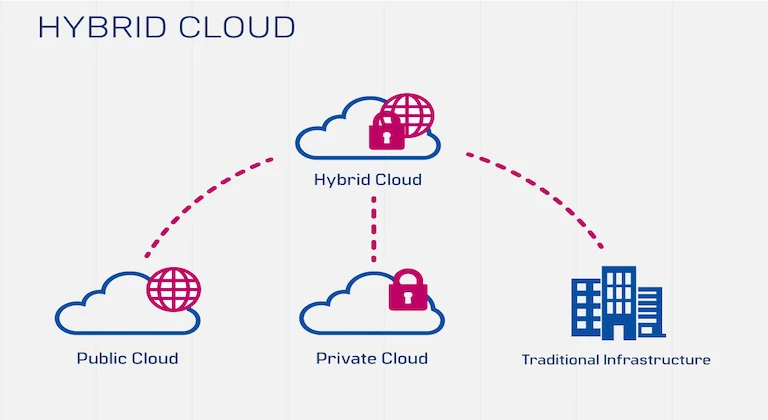
Hybrid cloud solutions are no longer a compromise between old infrastructure and new cloud services. For many organizations, they are the most practical architecture for running regulated data, legacy systems, modern applications, analytics, and burst traffic without forcing every workload into one place.
The core idea is simple: keep some systems in a private environment that the business controls, run other workloads in public cloud services, and connect both sides with networking, identity, security, monitoring, and automation. That model gives companies a way to modernize gradually while still respecting cost, compliance, latency, and operational reality. For a lighter introduction to the same concept, TechGrapple has a plain-English overview that explains why the approach appeals to businesses that need control and flexibility at the same time.
This guide goes deeper. It explains how a hybrid cloud architecture works, where different workloads should live, which benefits are real, which risks are often underestimated, and how to plan a migration without creating a messy two-platform environment. If you are still comparing the wider cloud computing landscape, this article can also be read alongside our guides on choosing the right cloud service provider and securing data in the cloud.
What Is a Hybrid Cloud?
A hybrid cloud is an IT environment that combines private infrastructure with public cloud resources and manages them as connected parts of one operating model. The private side may be a traditional on-premises data center, a private cloud, a colocation facility, or a dedicated hosted environment. The public side may include infrastructure, platform services, storage, analytics, AI services, managed databases, content delivery, or disaster recovery capacity from a cloud provider.
The important detail is not just that a company uses two environments. Many businesses use on-premises servers and public cloud tools separately, but that alone does not create a strong hybrid strategy. A real hybrid model includes integration: shared identity, secure connectivity, consistent policies, workload orchestration, logging, backup, monitoring, and a clear decision framework for where each application belongs.
Why Businesses Choose This Model
The strongest business case for hybrid cloud is selective placement. Some workloads need low latency near a factory floor, hospital system, trading desk, or internal database. Some need strict data residency. Some were built years ago and cannot be moved quickly. Others need elastic capacity for seasonal demand, global access, experimentation, or advanced analytics. A hybrid strategy lets the organization place each workload according to risk and value instead of following a one-size-fits-all migration plan.
This is especially useful for companies that have already invested heavily in servers, storage, licenses, network appliances, and operational processes. A full rebuild can be expensive and disruptive. Hybrid cloud allows modernization in phases: expose APIs, move backups, shift analytics, create cloud-native front ends, containerize parts of an application, or use public cloud for new services while core systems remain stable.
Workload Placement: What Should Run Where?
The best hybrid cloud decisions start with workload classification. Before moving anything, teams should map applications by data sensitivity, latency, dependencies, compliance obligations, traffic patterns, licensing terms, recovery objectives, and expected growth. That process often reveals that the right architecture is mixed by design.
| Workload or data type | Best fit | Why it fits | Key control to add |
|---|---|---|---|
| Highly regulated customer, health, payment, or legal records | Private environment or tightly governed cloud region | Needs strong control over access, retention, residency, and audit trails. | Encryption, privileged access controls, immutable logs, and data loss prevention. |
| Seasonal ecommerce traffic, campaign sites, and public APIs | Public cloud | Demand can spike quickly, so elastic capacity is more valuable than owned hardware. | Autoscaling limits, web application firewall rules, and cost alerts. |
| Legacy ERP, manufacturing systems, or database-heavy internal apps | Private side first, with gradual modernization | Dependencies, licensing, and latency can make fast migration risky. | API gateway, backup replication, and a dependency map before any move. |
| Analytics, machine learning, and batch processing | Public cloud or split pipeline | Public platforms offer large compute pools and managed data services without permanent capacity. | Data masking, clean-room datasets, and governed access to source systems. |
| Disaster recovery and backup | Hybrid | Cloud storage and standby capacity can improve recovery without duplicating every server. | Recovery testing, backup immutability, and documented RPO/RTO targets. |
Private Cloud vs Public Cloud vs Hybrid Cloud
Private, public, and hybrid environments each solve different problems. The goal is not to declare one universally better. The goal is to match business requirements to the right operating model.
| Factor | Private cloud / on-premises | Public cloud | Hybrid approach |
|---|---|---|---|
| Control | Highest control over hardware, location, and network boundaries. | Control is shared with the provider and shaped by service configuration. | Control is reserved for sensitive systems while public services handle scale. |
| Scalability | Limited by purchased capacity and procurement cycles. | Strong elasticity for compute, storage, and managed services. | Stable workloads stay predictable while variable demand bursts outward. |
| Cost model | Higher upfront investment and ongoing maintenance. | Usage-based spending, which can be efficient or expensive depending on governance. | Balanced cost model when workloads are placed deliberately. |
| Compliance | Useful when rules require strict data location or direct operational control. | Useful when provider certifications and regional controls match requirements. | Most flexible for mixed regulatory and commercial requirements. |
| Modernization speed | Slower unless the business invests in automation and platform engineering. | Fast access to managed databases, analytics, AI, and developer services. | Allows new services to move quickly while older systems are refactored over time. |
Benefits That Matter in Practice
1. Better control over sensitive data
Many businesses cannot move every dataset to a general-purpose public environment. A hybrid model lets them keep sensitive records close to existing controls while still using cloud services for customer portals, reporting, backups, testing, or analytics. This can be a strong fit for finance, healthcare, government, education, and any company handling personally identifiable information.
2. Elastic capacity without buying for peak demand
Buying enough hardware for the busiest week of the year wastes money during normal periods. Public cloud resources can absorb campaign traffic, batch jobs, test environments, and temporary compute demand. That is especially helpful for ecommerce, media, SaaS, and data-heavy teams.
3. Safer modernization of legacy applications
Some applications are too important to move quickly and too valuable to ignore. Hybrid architecture supports a staged path: keep the database private, move the web layer to the cloud, expose secure APIs, add cloud-based monitoring, or gradually rebuild components as cloud-native applications. This reduces migration risk while still moving the business forward.
4. Stronger disaster recovery
Using public cloud for backup, replication, and standby environments can improve resilience. Instead of maintaining a fully duplicated secondary data center, companies can replicate critical data and automate recovery processes. The key is testing. A disaster recovery plan that has not been rehearsed is only a document.
5. Better access to analytics and AI
Analytics pipelines often need large storage, temporary compute, and managed processing tools. With hybrid design, raw sensitive records can stay governed while clean, masked, or aggregated datasets move into cloud analytics platforms. Teams exploring data analytics in the cloud or AI in cloud computing should treat data governance as part of the architecture, not as a later cleanup task.
The Security Model Has to Be Consistent
Security is the point where many hybrid cloud projects succeed or fail. If the private side uses one identity model, the public cloud uses another, and administrators manage both manually, the architecture becomes harder to protect. A secure hybrid environment should make access, policy, logging, and incident response consistent across both sides.
At minimum, teams should define one identity strategy, require multi-factor authentication for privileged users, encrypt data in transit and at rest, centralize logs, classify data, and use infrastructure-as-code for repeatable deployments. Security teams should also review network routes, firewall rules, API exposure, backup access, and service accounts. The goal is to avoid building a bridge that attackers can use more easily than employees.
For a deeper checklist, see our guide on cloud security best practices. The same principles apply here, but hybrid environments require extra attention because the attack surface spans more than one platform.
Cost Management: The Hidden Discipline
Hybrid cloud can reduce waste, but it does not automatically reduce spending. Public cloud is flexible because resources can be created quickly. That same flexibility can create surprise bills when test systems are left running, data moves across regions, logs grow without retention policies, or teams overprovision managed services.
A realistic cost model should separate stable workloads from variable workloads. Stable workloads with predictable utilization may remain cheaper on committed private infrastructure. Variable workloads, experiments, analytics, and short-lived environments often fit public cloud economics better. The best result usually comes from a FinOps habit: budgets, tagging, alerts, rightsizing, reserved capacity where appropriate, and regular reviews with engineering and finance in the same conversation.
A Practical Implementation Roadmap
A successful hybrid cloud migration is usually incremental. The safest projects start with discovery, classification, and governance before production systems move.
- Inventory applications and dependencies. Map databases, APIs, file shares, authentication systems, batch jobs, network routes, and business owners. Many migration issues come from dependencies no one documented.
- Classify data and compliance requirements. Identify sensitive datasets, residency requirements, retention rules, encryption needs, and audit obligations.
- Design the network foundation. Plan connectivity, DNS, routing, firewall rules, segmentation, VPN or dedicated circuits, and secure access for administrators.
- Standardize identity and access. Centralize authentication where possible and remove shared administrator accounts. Privileged access should be logged and time-bound.
- Build a landing zone. Create reusable cloud account structures, policies, logging, backup defaults, tagging, monitoring, and deployment pipelines before teams start launching services.
- Start with low-risk workloads. Backups, dev/test environments, reporting replicas, content delivery, and non-critical web services are often safer first moves than the core transaction system.
- Modernize in layers. Use APIs, containers, managed databases, and serverless computing where they remove operational burden. Avoid rewriting everything just to say it is in the cloud.
- Test recovery and rollback. Every migration wave should include restore tests, failover tests, rollback plans, and clear ownership.
Common Mistakes to Avoid
Mistake one: treating hybrid cloud as a hosting choice instead of an operating model. The technology matters, but governance matters more. Without shared policy, monitoring, cost controls, and ownership, the environment becomes harder to manage than either platform alone.
Mistake two: moving applications before understanding dependencies. A web app may look simple until it relies on a local database, a file share, a licensing server, a scheduled job, and an internal authentication system. Dependency mapping should happen before migration planning.
Mistake three: ignoring data gravity. Large datasets are expensive and slow to move. If an application constantly pulls data from the private side into public cloud compute, latency and transfer costs can damage performance and budgets.
Mistake four: assuming cloud security is automatic. Cloud providers secure the underlying platform, but customers still configure identities, permissions, networks, workloads, encryption, and data access. Misconfiguration remains one of the biggest practical risks.
Mistake five: failing to train teams. Administrators, developers, security teams, finance teams, and business owners all need a shared vocabulary. Hybrid cloud is not only an infrastructure project; it changes how systems are built, paid for, monitored, and supported.
When Hybrid Cloud Is the Right Choice
Hybrid cloud is a strong fit when the organization has mixed needs: sensitive data that must remain controlled, applications that cannot move quickly, business demand that changes sharply, and new digital services that need speed. It is also useful when mergers, regional regulations, edge locations, or legacy investments make a single-platform strategy unrealistic.
It may not be the best choice for every company. A small team with mostly standard SaaS tools and no legacy constraints may be better served by a simpler public cloud or managed platform approach. A highly regulated organization with strict isolation requirements may need a mostly private model. The architecture should follow the workload, not the trend.
FAQ
Is hybrid cloud the same as multi-cloud?
No. Hybrid cloud combines private infrastructure with public cloud resources. Multi-cloud means using services from more than one public cloud provider. A company can have both, but they solve different problems.
Does hybrid cloud improve security?
It can, but only when designed well. Keeping sensitive systems private can reduce exposure, but connecting environments also creates new paths that must be protected. Strong identity, encryption, logging, segmentation, and governance are essential.
Is hybrid cloud cheaper than public cloud?
Sometimes. It depends on workload behavior. Predictable workloads may be cheaper on committed infrastructure, while variable workloads may be cheaper in public cloud. Cost management must be active, measured, and reviewed regularly.
What is the first workload to move?
Many companies start with backup, disaster recovery, reporting replicas, dev/test environments, or public web front ends. These projects create value and experience without immediately risking the most critical systems.
Conclusion
Hybrid cloud solutions work best when they are intentional. The value is not simply having servers in one place and services in another. The value comes from placing each workload where it performs best, protecting data according to risk, giving teams access to modern cloud capabilities, and managing everything through consistent policy.
For businesses with existing infrastructure, compliance obligations, variable demand, or modernization goals, hybrid cloud can be the bridge between stability and speed. The companies that get the most from it are the ones that classify workloads carefully, build strong governance early, control costs continuously, and treat the architecture as a long-term operating model rather than a one-time migration project.