Serverless computing helps developers build applications without managing servers directly. The servers still exist, but the cloud platform handles provisioning, scaling, runtime management, and much of the operational work. The development team focuses on code, events, business logic, security, monitoring, and cost control.
This model is useful when an application responds to events: an API request, file upload, database change, scheduled job, message queue, user action, or sensor signal. Instead of keeping a server running all day, a serverless function can run only when work arrives. That can make development faster and reduce waste, especially for workloads that are irregular or unpredictable.
Serverless is not the right answer for every system. It can create new challenges around cold starts, debugging, vendor lock-in, observability, timeout limits, and hidden costs. This guide explains how serverless works, where it fits, where it does not, and how to build serverless applications in a safe and practical way. For broader context, read our guides on cloud-native applications and future cloud computing trends.
What Is Serverless Computing?
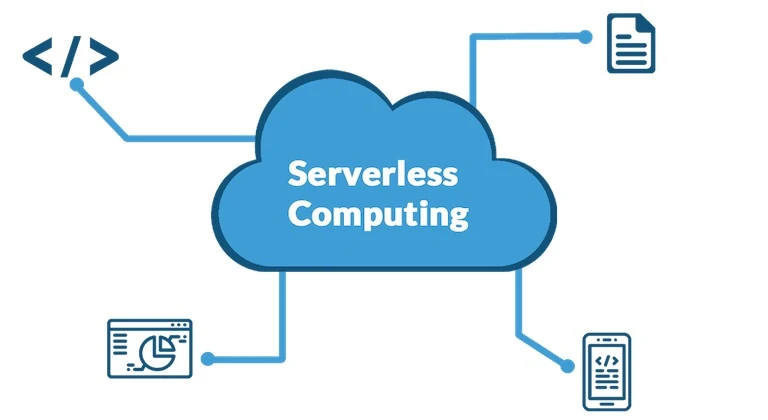
Serverless computing is a cloud model where developers deploy code or services without managing the underlying servers. The platform starts the runtime, allocates resources, scales capacity, and charges based on usage. In many cases, billing is tied to the number of requests, execution time, memory, and related services.
The most common form is Functions as a Service, often called FaaS. A function is a small unit of code that runs when triggered by an event. Serverless can also include managed databases, queues, workflow services, API gateways, authentication services, and storage events. In practice, serverless applications are often built from several managed services working together.
When Serverless Is a Good Fit
Serverless works best when work arrives in bursts, events, or short jobs. It is also useful when a team wants to reduce infrastructure management and move faster. The model fits many modern application patterns, but it should be chosen for a reason.
| Use case | Why serverless fits | Good example | Watch out for |
|---|---|---|---|
| API endpoints | Functions can scale with request volume and run only when called. | A checkout validation endpoint or user profile update API. | Cold starts, authentication, rate limits, and downstream database load. |
| File processing | A file upload can trigger work automatically. | Resize an image, scan a document, or convert a report. | Large files, long execution times, retries, and storage permissions. |
| Scheduled jobs | Code can run on a timer without a dedicated server. | Send reminders, clean old records, or refresh a report. | Missed schedules, duplicate runs, and weak error reporting. |
| Data pipelines | Events can move data between storage, queues, and analytics tools. | Process new sales records into a reporting table. | Data quality, ordering, retries, and cost from high event volume. |
| IoT and alerts | Device events can trigger small pieces of logic quickly. | Send an alert when a sensor reports a leak or high temperature. | Event spikes, duplicate messages, and device identity security. |
When Serverless May Not Be the Best Choice
Serverless is not ideal for every workload. Long-running jobs, highly predictable always-on systems, very low-latency applications, heavy background workers, and workloads that need deep runtime control may fit containers, managed platforms, or virtual machines better.
A system with constant high traffic may not save money with serverless. A workload that needs stable warm capacity may need special configuration. A complex application with many functions can also become hard to reason about if there is no clear event map. The best architecture is the one that fits the workload, not the one that sounds newest.
Benefits of Serverless Computing
1. Less infrastructure management
Teams do not need to provision servers, patch operating systems, or manually scale runtime capacity for every function. That lets developers focus more on business logic, testing, security, and user experience.
2. Automatic scaling
Serverless platforms can scale from a few requests to many requests without the team manually adding servers. This is useful for traffic spikes, seasonal campaigns, background jobs, and unpredictable event volume.
3. Usage-based cost
In many cases, serverless costs less because code runs only when needed. This is especially helpful for small workloads, prototypes, scheduled jobs, and services that sit idle for long periods.
4. Faster delivery
Serverless encourages small units of work. A team can build and deploy a focused function without creating a full application stack. This can speed up experiments and reduce operational setup.
5. Strong fit with cloud-native development
Serverless works well with modern cloud-native systems. It can support APIs, queues, workflows, storage events, and data processing. For a broader view of this architecture style, see our guide to cloud-native applications.
Cold Starts and Performance
A cold start happens when a function has not been used recently and the platform needs time to prepare the runtime before the code runs. This can add delay. The impact depends on the runtime, package size, network setup, memory, provider behavior, and traffic pattern.
Cold starts do not matter for every workload. A scheduled report or file conversion can usually tolerate a small delay. A customer-facing checkout API or live chat action may not. Teams can reduce cold-start risk by keeping functions small, limiting dependencies, choosing efficient runtimes, avoiding unnecessary network setup, and using platform features for warm capacity when needed.
Cost Management in Serverless
Serverless can be cost-effective, but it is not automatically cheap. The bill may include function execution, API gateways, storage, queues, logs, data transfer, managed databases, workflow steps, and monitoring. A high-volume event stream can become expensive quickly if every event triggers several functions and writes large logs.
Good cost control starts with measurement. Tag services, set budgets, monitor event volume, limit retries, control log retention, and review unused functions. If a workload runs constantly, compare serverless pricing with containers or managed application platforms before deciding.
Security and Permissions
Serverless security depends heavily on permissions. Each function should have only the access it needs. A function that reads from storage does not need broad database access. A function that sends email does not need permission to delete files. Small permissions reduce damage if a function is misused.
Teams should also protect secrets, validate inputs, scan dependencies, encrypt data, log sensitive actions, and review public endpoints. For a stronger baseline, see our article on cloud security best practices.
Observability and Debugging
Serverless applications can be harder to debug because work is spread across functions, queues, APIs, databases, and managed services. A user action may trigger several steps. If one step fails silently, the system can be difficult to understand without good observability.
Use structured logs, metrics, traces, correlation IDs, alerts, dashboards, and dead-letter queues. Log enough to understand what happened, but do not log sensitive data. Track failure rates, retry counts, execution time, cold starts, queue age, and downstream service errors.
| Operational area | What to measure | Why it matters | Good practice |
|---|---|---|---|
| Reliability | Errors, retries, timeouts, dead-letter messages. | Shows whether events are completing successfully. | Create alerts for repeated failures, not only single errors. |
| Performance | Duration, cold starts, downstream response time. | Helps find slow functions and slow dependencies. | Keep functions small and measure external service calls. |
| Cost | Invocation count, memory, logs, data transfer, related services. | Serverless cost often comes from the whole workflow, not one function. | Use budgets, tags, and retention rules. |
| Security | Permission changes, failed auth, unusual invocation patterns. | Functions can expose sensitive services if permissions are too broad. | Use least privilege and review roles regularly. |
| Data quality | Missing fields, invalid events, duplicate events, late events. | Event-driven systems must handle messy real-world input. | Validate events and design idempotent processing. |
Best Practices for Serverless Applications
- Keep functions focused. Each function should do one clear job and be easy to test.
- Design for retries. Events may be delivered more than once, so functions should avoid duplicate side effects.
- Use queues for pressure control. A queue can protect databases and downstream services from sudden spikes.
- Limit permissions. Give each function only the access it needs.
- Set timeouts deliberately. Long timeouts can hide problems and increase cost.
- Control logging. Logs are essential, but too much logging can become expensive and risky.
- Automate deployment. Use CI/CD, tests, and infrastructure-as-code so changes are repeatable.
- Plan rollback. Every production change should have a safe way back.
Serverless and Data Analytics
Serverless is useful in data workflows. A file upload can trigger validation. A new record can trigger enrichment. A scheduled function can refresh a report. A queue can move events into a warehouse or lakehouse. This makes serverless a practical part of cloud analytics pipelines.
For larger data systems, serverless should be combined with clear data quality rules, storage lifecycle policies, and cost controls. Our guide to data analytics in the cloud explains how ingestion, storage, transformation, and governance fit together.
Serverless, IoT, and Automation
Serverless also fits IoT and home or industrial automation because devices often send events instead of constant traffic. A sensor reports a reading, a function checks the value, and the system sends an alert or stores the data. This pattern can scale well when many devices send small messages.
The same idea appears in smart home systems, where events trigger actions. Our guide to IoT home automation explains how sensor signals, rules, and actions connect in everyday environments.
FAQ
Does serverless mean there are no servers?
No. Servers still exist. The difference is that the cloud provider manages them, and the development team works at a higher level.
Is serverless always cheaper?
No. Serverless can be cheaper for variable and event-driven workloads. Constant high-traffic workloads may be cheaper on containers or other managed platforms.
What is a cold start?
A cold start is a delay that can happen when the platform prepares a function runtime after it has been idle. It matters most for user-facing low-latency workloads.
Can serverless be used for full applications?
Yes, but full serverless applications need careful design around events, permissions, observability, testing, data storage, retries, and cost control.
Conclusion
Serverless computing can make cloud development faster and simpler when the workload fits the model. It works especially well for event-driven APIs, file processing, scheduled jobs, data pipelines, alerts, and automation tasks. It reduces server management and can scale quickly with demand.
The best serverless systems are designed with discipline. Keep functions focused, secure permissions, measure cost, plan for retries, monitor every workflow, and choose serverless only where it solves a real problem. Used that way, serverless becomes a practical tool for building modern cloud applications without unnecessary infrastructure overhead.