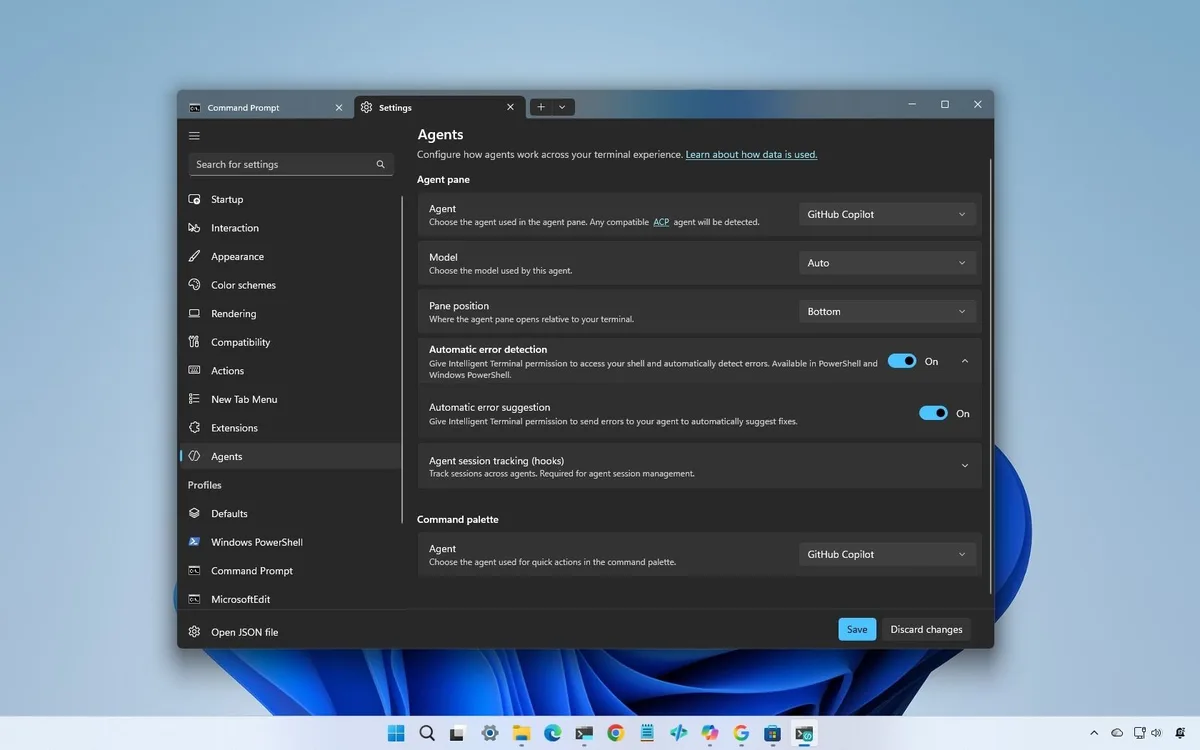
Microsoft's new AI-powered Terminal preview is a software story, but it also says a lot about where personal computers are going. The terminal has always been a serious workspace for developers and power users. By adding AI assistance, background agent behavior, and a more guided workflow, Microsoft is treating the command line as a place where the PC can help plan and execute tasks instead of simply waiting for typed instructions.
This matters because AI PCs are often discussed through chips, TOPS ratings, and NPU branding. Those specs are useful, but users feel the change through interfaces. A smarter terminal is one of the clearest signs that Microsoft wants AI to live inside the tools professionals already use. The result is less like a chatbot bolted onto Windows and more like a command environment that understands context, files, and intent.
Windows Central described the experience as separate from the existing Windows Terminal, with Copilot-style assistance and agent support changing the feel of the tool. That separation is important because Microsoft can experiment without immediately disrupting the standard terminal used by millions of people.
The hardware connection is visible in our coverage of local agentic AI workstations. As more AI tasks run on or near the device, the operating system needs places for those tasks to be launched, supervised, and corrected. A terminal is a natural fit because developers already trust it for precise work. The challenge is making assistance useful without making the tool feel unpredictable.
There are risks. Developers will not accept an AI terminal that hides commands, invents flags, or changes files without clear confirmation. The best version should explain what it is doing, show commands before execution, and preserve the user's control. If Microsoft gets that balance right, the terminal could become one of the most practical AI interfaces in Windows. If it gets the balance wrong, power users will simply return to the classic tools.
The preview is worth watching because it reveals Microsoft's direction more clearly than a slogan about AI PCs. The company wants Windows devices to become places where agents can work beside the user, not only answer questions. A smarter terminal is a small surface area with large implications: coding, administration, debugging, automation, and device management could all become more conversational without becoming less exact.
The most useful version of this tool would also help less experienced users learn the command line without pretending risk has disappeared. A terminal is powerful because it can change a system quickly; that same power makes bad suggestions dangerous. Microsoft can reduce that risk by making the AI explain why a command is appropriate, identify the files or services it may touch, and offer a reversible plan when possible. That would make the terminal a teaching layer as much as an automation layer. It could help administrators move faster, but it could also help students and new developers understand what is happening beneath a graphical app. If the product earns trust in those moments, it becomes more than a novelty. It becomes a practical bridge between natural language and exact system control.